Sticky Chunks dev log
Each build linked on this page is an archived build from that exact date! Consider this page your opportunity to spelunk through Chunks History (spelchunk?). Observe the slow march of game development through many small iterative changes. I may also write random articles and thoughts as they occur to me.
If you would like to be notified of updates and articles such as those you see below, consider joining Chunks Club.
Older versions
I've written up bits and pieces of this history and maybe at some point I will document them publicly here. There were various reboots and false starts that resulted in nearly three years between the first complete Pico-8 prototype and the first playable modernized version. Fortunately a lot of that work ended up being useful.
The finished Pico-8 build is still playable here.
Sticky Chunks 2024-01-21 — Play it
This is not the first fully playable version I uploaded for playtesting. It is the first build I personally played for an extended period, due to lack of motivation to work on it, but a strong desire to play it. It is also the first build from the time when I started archiving old builds. It has four control schemes, fancy shaders and various unnecessary UI niceties.
Compared to the pico-8 version, GBA version, other prototypes and false starts, and other early unreleased alphas, this version uses a smaller grid — 8x8 instead of 9x9. This appears to improve the pacing a fair amount. It also makes the game easier to use on a touch screen due to the buttons being a bit larger.
Since it's the first build I'm listing here I haven't bothered listing its change notes. Doing so would amount to summarizing every single commit in the development of both the GBA version and this version — several months of occasional nights and weekends.
Sticky Chunks 2024-05-21 — Play it
My high score on this build: 447. I don't know how I did it, must have had some blessed luck.
The main issue I noticed watching playtesters play earlier builds was that players would drag chunks into position and then would not tap the chunk to lock in their placement. I had designed it to require this lock-in tap in order to prevent accidental placement.
After a long time thinking on the problem I realized instead of a tap outside the chunk resulting in a cancel and attempted grab, I could make such taps attempt a placement (which if failed will naturally cancel) and then a potential grab at the tapped location. This would perfectly reflect the touch inputs players were already performing. It took a good amount of adjustment for me to play this way and I found myself wishing for a cancel button — which I will eventually add — but I think the game needed it.
- ⭐️ Tapping anywhere while a chunk is held by the cursor will attempt to drop that chunk wherever it is positioned.
- ⭐️ Increased number of chunks in Hand from 3 to 4. Reduced the size of the chunks in the hand accordingly.
- ⭐️ Added a preview of the shapes and colors of the next 8 upcoming chunks in the draw pile. In my experience playing Sticky Chunks, hiding information makes players more dependent on luck. I wanted to increase the skill factor which means giving more information with which to form strategies.
- Removed instances of the "i" pentomino from the draw pile, since it is too long to fit inside the reduced-size Hand tiles.
- Improved behavior of Hand tiles so they hide their chunk when the cursor is holding it, to reduce confusion.
- Fixed various control and rendering bugs related to the increased hand size.
- Fixed a bug where an incorrect score differential can display near the cursor for one frame after rotating a chunk.
Known issues
- (Touch/Mouse) Dragging a chunk from your Hand after positioning another chunk from your hand may result in grabbing a different chunk than intended. This is the main issue I expected to hear about from this build.
- (Touch/Mouse) Dragging a chunk to the sell space requires a confirmation tap which might be flaky. This sell space is likely temporary.
Sticky Chunks 2024-05-27 — Play it
My high score on this build: 364. There shouldn't have been any changes that would affect scoring compared to the prior build.
This build fixes a rather annoying bug, but otherwise is focused mainly on presentation improvements.
- ⭐️ Fixed: (Touch/Mouse) Dragging a chunk from your Hand after positioning another chunk from your hand now always grabs the correct chunk.
- ⭐️ Added slide-into-place animations to all the chunk tiles in the draw pile and in the hand.
- ⭐️ Added a number indicating how many chunks remain in the draw pile.
- 💬 I'm testing out some different colors for chunks in the draw pile.
- Seeking feedback on whether this looks clear or if it just distracts compared to the prior build.
- Chunks in the draw pile are now fanned-out with a bit of overlap to better indicate their order.
Thoughts On the Inevitability of Tetris
There's this common thought experiment where people will sometimes claim that Tetris is such a likely game design discovery that an alien civilization would also invent Tetris, given enough time.
This idea vastly discounts the vastness of the design space of games involving moving and rotating chunks.
One should not underestimate the creative leap between playing with pentomino puzzles to designing one of the greatest arcade games of all time. The game may look like an inevitable discovery in retrospect due to its simplicity. The concepts of applying gravity and of clearing full lines are each deeply non-obvious.
In my notes app as of this writing I have about a thousand words of scattered thoughts and ideas about Sticky Chunks features, game variants and plans. In the "game variants" umbrella I have over 40 varied small and large changes to the format of Sticky Chunks. Some of these are minor rule changes, some describe completely different games. In fact, one of those completely different game concepts is the idea that inspired Sticky Chunks! I didn't even make the first idea I had.
A few randomly picked examples of complicated variants I have not explored:
- “Greedy Chunks” — Can only sell chunks that have value, cannot trash zero-value chunks.
- “Gluey Chunks” — Chunks cannot be moved once on the board.
- “Stompy Chunks” — Allow overlapping placement.
- “City Chunks” — Inspired by Pipe Dream. Roads are on top of chunks, connections form based on linked roads.
- “Heavy Chunks” — Sticky Chunks but with gravity pulling chunks to the bottom of the board.
- “Wonky Chunks” — focus on unwieldy pentomino shapes like F,X,W,Y,Z.
- "Roomy Chunks" / "Cozy Chunks" — Sticky Chunks played with a larger or smaller play area.
- "Honey Chunks" — Sticky Chunks played with hexagons instead of squares.
The many small and large mechanical changes one could be mixed and matched to transform Sticky Chunks into many different games. And these are all examples that don't drastically change Sticky Chunks's low-pressure pacing and mechanics.
There are surely hundreds of other games Alexey Pajitnov could have invented by taking inspiration from pentomino puzzles. This inevitability concept caught hold because the game seems obvious in retrospect. Tetris required someone with a deep interest in polyomino shapes to design it. Various constraints led Pajitnov to a simple and elegant design.
On the topic of constraints: I made Sticky Chunks because it was easier to make than the game I had in my head when I started.
Sticky Chunks 2024-06-04 — Play it
This build has lower scoring potential than recent builds because of a significant change to the chunk distribution. I believe my best score was 314. There are fewer chunks overall. You'll see fewer pentominos and more small shapes.
This build is focused on visual improvements. I've added three new lighting layers which should improve depth, dimension and physicality.
- ⭐️ New lighting effects! The board has a new shading layer, chunks cast soft ambient shadows, and chunks now have a faint color-tinted glow approximating light reflecting off of them and landing on the board.
- ✨❤️ Changed appearance of chunk color 1 in classic color scheme to use hearts instead of sparkles.
- 🔢 Chunk distribution adjustments. Total chunk count reduced from 74 to 68.
- Monomino count increased from 3 to 5
- Domino count increased from 2 to 5
- Tromino count increased from 2x2 to 5x2
- Tetromino count remains at 2x7
- Pentomino count decreased from 3x17 to 2x17
- Fixed: Chunks in the Hand and the Draw Pile are now properly centered.
- Added slide-into-place animations to all the chunk tiles in the Draw Pile and in the Hand.
- Reverted an earlier change which darkened the appearance of chunks in the Draw Pile.
- Added UI state visually indicating "cannot grab chunk from Hand due to invalid placement."
- Chunks in the Draw Pile now shift around to fill out the full horizontal space after grabbing a chunk from the Hand.
- Adjusted "remaining chunk count" display.
- Add favicons.
2024-11-24 — New Chunks Just Dropped
Sticky Chunks development has been rather stunted recently, but I have a good reason. I've been ramping up my Chunks 3D printing project to try and reach a point where you could have chunks of your very own.
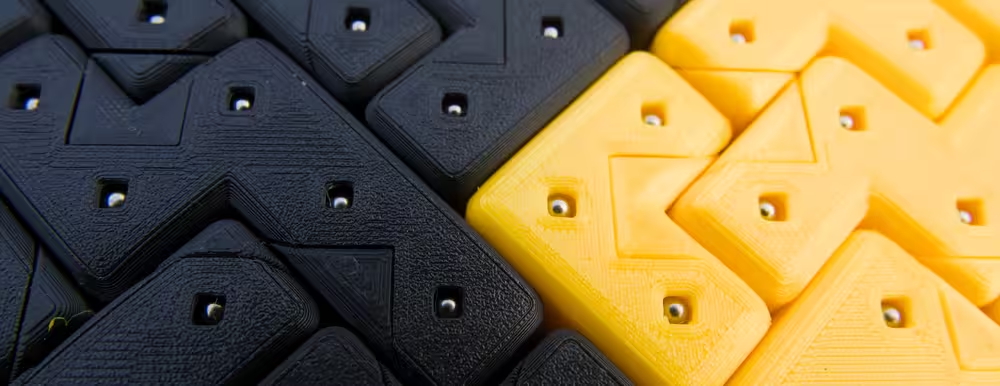
Check it out. I made a whole dang web page and everything.
Buy some Chunks if you want.
I want you to buy some Chunks.
I've given their design a Tim level of stupid attention to detail, if that means anything to you.
Sticky Chunks 2024-12-16 — Play it
Since the last time I updated the devlog I made significant polish improvements across many builds which I'll summarize here:
- ⭐️🛠️ Added a toolbar to the bottom of the screen with buttons for touch- and mouse-friendly controls.
- ⭐️↔️ Added a new Flip button to mirror chunks when you happen to get a chunk of the wrong handed-ness.
- ⭐️🔈️ New sound design with mostly realistic sounds (recorded in my closet!) Make sure your phone isn't on silent!
- ⭐️🪙️ Added detailed coin physics.
- New coins fall in from the top of the screen instead of appearing instantly.
- Coins are jostled into the air by varying amounts when grabbing, dropping, rotating or flipping a chunk.
- 🔈️ Added many coin collision sound effects.
- ⭐️✨️ Add sparkle effect when cursor is holding a chunk in a position where dropping it will cause chunks to stick together.
- 🗜️ Reduced download size by compressing sprites, sound effects, and removing some of the unused resources.
- Added clamping behavior so chunks can't be positioned with parts outside the play area, even when flipping or rotating.
- Reimplemented the feature of the Pico-8 prototype where pressing the rotate button on controller/keyboard instantly jumped to the chunks in your hand.
- Removed the "Drag here to Sell" space, now that there is a sell button in the toolbar.
- ▶️ Added a "click to play" button on first load to work around some issues with acquiring an audio context. Audio should be enabled more reliably now.
Sticky Chunks 2025-01-28 — Play it
Little big new feature!
- ⭐️ Added a score screen!!
- 🔁 This completes the game loop: finishing a game takes you to the score screen. The score screen takes you back to the game. No more needing to refresh the page to continue playing!
- 📚🪙 Chunks you sold/trashed during your game lay out in nice tidy rows, with their values displayed. The layout style is inspired by the web flexbox tool.
- 🎞️🔈 Added various animations and sounds to the score screen: Fade to black before the score screen, chunks sliding in, squash and stretch, and celebratory sound effects to accompany all the movement, fade in on returning to game.
- ❌🆙 Revived the score multiplier from pico-8 on the end-game score display. This is temporary, as I plan to rework the game structure in a major way which will change how the game is scored, but it's nice to have some level of rough parity with pico-8 for now. Scores are totally incomparable of course because the piece distribution and game length are different, and most importantly the board size is different.
Sticky Chunks 2025-08-30 — Play it
- 👾 Added full screen dither effect, in imitation of PS1/PSP color limitations.
- 📺 Changed fade to black to use subtract blend mode for PS1 style fade to black.
- Pre-render chunks in queue and end screen as an optimization.
- 🪙 Added new coin colors. Coins scale in value when playing efficiently. These coins will factor into a game structure change I have planned where the game starts on one color and new colors are gradually added.
- 💡 Lighting adjustments.
- ⬆️🔄 New animations for drag tutorial arrow, rotate button.
- ✨ Toolbar buttons track whether they have been used and try to draw attention if not.
Known issue across all prior builds
- Audio may become disabled on mobile after leaving the tab and returning, and will not return until the page is reloaded.
Web site updates for 2025

I added a new home page! This is designed to solve the problem of there being a bunch of pages on this site that basically no one knows exists unless they come here from my personal site. This devlog is one of those pages!
I added a nice video for the background of the play button. It consists of a video capture of Sticky Chunks, rendered in Blender. I used an RGB subpixel shader my brother Ricky made in blender. I applied depth of field to the camera to give it a convincing photographic look.
New game: Chunkster — Play it
I built a new game! It's called Chunkster. I made it for the Falling Block Jam 2025 over the course of one week. I built the game as a fork of Sticky Chunks.
The game concept I had in my head was: What if Tetris-like piece rotation rules could be used in a puzzle-platformer?
I expanded the board size to double that of Sticky Chunks so I would have more space to work with for level design. I ripped out as much unneeded code as possible, and reworked the game to support loading level layouts from images. I took all the color schemes I already had set up, and separated the individual colors for selection in the level design process. I used Aseprite as my level editor, with images consisting of:
- One pixel per tile
- Pixel color determines which tile to use.
- Pixel alpha is used for markup: Special alpha values indicate pushable blocks, player-controlled blocks, or parts of pushable blocks proceeding into the background.
I built a system where each rotation rule is expressed as one line of a C++ struct definition. The order of the rules controls priority, and each rule can specify constraints as to whether any nearby space should be solid or empty. If a rotation was misbehaving, I could either reorder the rules, add new rules, or add extra constraints to existing rules. Flips run through the same system as rotations, but there are far fewer rules controlling flips than there are for rotations.
The piece movement and rotation rules took up the most development time, as there are hundreds of individual hand-written rules dictating how the player's chunk should move when a rotate button is pressed. Making this easy to adjust was worthwhile.
Rotation system code
The __LINE__ macros allow me to use printf debugging to trace what line of code was responsible for the chosen rule.
RotationSystem g_sys5F =
{
	.initial = {
		.clockwise = {
			{__LINE__,-2, 0, Solid(-1,-1), Empty( 1, 0), Empty(-2, 1), }, // backward pivot off overhead hooked block
			{__LINE__,-2, 1, Solid(-1,-1), }, // backward squeeze kick down through diagonal gap
			{__LINE__, 0, 2, Solid(-1, 1), Empty( 0, 1), Empty( 1, 1), Empty( 1, 2), }, // left hooked descend

			{__LINE__, 2, 0, Solid( 0, 2), }, // far roll if grounded
			{__LINE__, 1, 0, }, // medium roll

			{__LINE__, 2,-1, Solid( 3, 1), }, // climb furthest
			{__LINE__, 1,-1, Solid( 2, 1), }, // climb far step
			{__LINE__, 1,-1, Solid( 1, 0), }, // right-hooked climb
			{__LINE__, 0,-1, Solid( 1, 1), }, // right-hooked step
			{__LINE__, 1,-2, Solid( 2, 0), }, // climb far ledge
			{__LINE__, 0,-2, Solid( 1, 0), Empty(-1,-1), }, // climb near ledge straight up

			{__LINE__, 1, 2, Empty( 1, 0), }, // far roll descend
			{__LINE__, 1,-1, }, // short roll descend

			{__LINE__, 0, 0, }, // in place
			{__LINE__, 0,-1, }, // climb in place
		}, .counterClockwise = {
			{__LINE__, 0, 1, Solid( 1, 0), }, // descend from right hook / ladder
			{__LINE__, 1, 1, Solid( 1, 0), Empty( 0, 2), }, // right hooked reverse pull down
			{__LINE__, 0,-2, Solid(-1, 1), Solid(-1,-1), Empty( 1, 0), Empty( 0,-3), }, // climb up in place side ladder style
			{__LINE__, 1, 0, Solid(-1,-1), }, // kick off left hook

			{__LINE__,-2, 0, Empty(-1,-1), Empty(-2,-1), }, // far roll
			{__LINE__,-1, 0, Empty(-1,-1), }, // short roll

			{__LINE__,-2,-1, Solid(-2, 1), Empty( 0,-2), Empty(-1,-2), Empty(-2,-2), }, // far stair
			{__LINE__,-1,-1, Solid(-1, 1), Empty( 0,-2), Empty(-1,-2), }, // near stair
			#ifdef UNHOOKED_LEDGE_CLIMB
			{__LINE__,-1,-1, Solid(-2, 0), Empty( 0,-2), Empty(-1,-2), }, // ledge climb
			#endif

			{__LINE__,-2, 1, Solid( 1, 0), }, // far step down
			{__LINE__,-2, 1, Solid( 1, 0), }, // short step down

			{__LINE__, 0, 0, }, // in place
			// {__LINE__, 0,-1, }, // climb in place
		}, .flip = {
			{__LINE__, 0, 0, }, // in place
			{__LINE__,-1, 0, }, // kick left
			{__LINE__, 1, 0, }, // kick right
		},
	}, .right = {
		.clockwise = {
			{__LINE__,-2, 0, Solid(-1,-1), Empty( 0, 1), Empty(-1, 1), }, // backward pivot off overhead hooked block
			{__LINE__, 0, 1, Solid(-1, 1), }, // bottom-hooked descend
			{__LINE__, 1, 1, Solid( 0, 1), }, // bottom-hooked descend and right
			{__LINE__, 2, 1, Solid( 0, 1), Solid( 2,-1), }, // kick down through narrow diagonal gap
			{__LINE__, 1, 1, Solid(-1, 1), Solid( 1,-1), }, // kick down through narrow diagonal gap

			{__LINE__, 3, 0, Solid( 1, 2), Empty( 2,-1), Empty( 1,-1), Empty( 2,0), }, // far roll if grounded
			{__LINE__, 2, 0, Empty( 1,-1), }, // med roll
			{__LINE__, 1, 0, }, // short roll

			{__LINE__, 2,-1, Solid( 2, 1), Empty( 1,-1), Empty( 1,-2), }, // stair climb
			#ifdef UNHOOKED_LEDGE_CLIMB
			{__LINE__, 1,-1, Solid( 2, 0), Empty(-1,-1),  }, // ledge climb
			#endif

			{__LINE__, 0, 0, }, // in place
			{__LINE__, 0,-1, }, // climb in place
		}, .counterClockwise = {
			{__LINE__, 2, 0, Solid( 1,-1), Empty( 0, 1), Empty( 3, 0), }, // backward pivot off overhead hooked block
			{__LINE__,-1, 2, Empty( 2, 0), Empty( 2, 1), }, // far ledge down
			{__LINE__,-1, 1, }, // right hooked spin

			{__LINE__,-2, 0, }, // far roll no matter the ground
			{__LINE__,-1, 0, }, // short roll

			{__LINE__, 0, 1, }, // kick down
			{__LINE__,-2,-1, Solid(-2, 1), Empty(-1,-1), }, // far stair
			#ifdef UNHOOKED_LEDGE_CLIMB
			{__LINE__,-1,-1, Solid(-2, 0), Empty( 1,-1), }, // ledge climb
			#endif
			{__LINE__,-1,-1, Solid(-1, 1), Empty( 1,-1), }, // near stair
			{__LINE__, 0,-1, Solid(-1, 1), Empty( 1,-1), }, // kick up
			{__LINE__, 0,-2, Solid(-1, 1), Solid(-1,-1), Empty( 1,-1), Empty( 1,-2), }, // climb in place side ladder style
			{__LINE__, 0, 0, }, // in place
			{__LINE__, 0,-1, Empty( 1,-1), }, // climb in place
		}, .flip = {
			{__LINE__, 2, 0, Empty( 1,-1), }, // kick / pivot on heel
			{__LINE__, 1, 0, }, // kick

			{__LINE__, 0, 0, Empty( 0, 1), }, // in place
			// {__LINE__, 0,-1, }, // climb in place
		},
	}, .upsideDown = {
		.clockwise = {
			{__LINE__, 2, 0, }, // far roll
			{__LINE__, 1, 0, Empty( 1,-1), }, // near roll

			{__LINE__, 2,-1, Solid( 2, 1), Empty(-1, 0), Empty(-1,-1), }, // far stair climb
			#ifdef UNHOOKED_LEDGE_CLIMB
			{__LINE__, 1,-1, Solid( 2, 0), Empty(-1, 0), Empty(-1,-1), }, // ledge climb
			#endif
			{__LINE__, 1,-1, Solid( 1, 1), Empty(-1, 0), Empty(-1,-1), }, // near stair climb
			{__LINE__, 2,-1, Solid( 1, 1), Empty(-1, 0), }, // near stair climb onto wider stair
			{__LINE__, 0,-2, Solid( 1, 1), Solid( 1,-1), Empty(-1, 0), Empty(-1,-1), }, // climb in place side ladder style

			{__LINE__, 0, 1, }, // kick down
			{__LINE__, 1, 1, Empty( 1,-1), }, // down near stair
			{__LINE__, 2, 1, Empty( 1,-1), Empty( 2, 0), }, // down far stair

			{__LINE__, 0, 0, }, // in place
			{__LINE__,-1, 0, Solid( 1,-1), }, // backward pivot kick off overhead hooked block
			{__LINE__,-1, 1, Solid(-1, 0)}, // backward downward pivot (no regular backward pivot exists)
			{__LINE__,-1, 1, Solid(-1,-1)}, // backward downward pivot (no regular backward pivot exists)
			{__LINE__,-1, 0, }, // backward pivot / kick
		}, .counterClockwise = {
			{__LINE__,-2, 1, Solid( 1,-1), Empty( 1, 1), Empty( 2, 1), }, // backwards pivot on upper right corner block
			{__LINE__,-1,-1, Solid(-1, 0), Empty( 1, 1), Empty( 1,-1), Empty( 0,-1), }, // left hooked climb up
			{__LINE__, 0,-1, Solid(-1, 0), }, // left ladder climb up
			{__LINE__, 1, 0, Solid(-1, 0), Empty( 1, 1), }, // backward kick pivot off left hooked block
			{__LINE__, 2, 0, Solid( 1,-1), Empty( 1, 1), Empty( 2, 1), }, // backward pivot off overhead hooked block

			{__LINE__,-3, 0, Solid(-1, 2), Empty(-2,-1), Empty(-1,-1), Empty(-1, 0), }, // far roll
			{__LINE__,-2, 0, Empty(-1,-1), }, // mid roll
			{__LINE__,-1, 0, }, // near roll

			{__LINE__,-2,-1, Solid(-3, 0), }, // far ledge
			{__LINE__,-2,-1, Solid(-2, 0), }, // near ledge
			{__LINE__,-1,-1, Solid(-1, 0), }, // left hooked climb

			// no rule for a stair on left due to long overhang
			{__LINE__, 0, 2, Empty(-1, 0), Empty( 0, 3), }, // hooked descend
			{__LINE__,-2, 1, Empty(-1, 0), Empty(-1,-1), }, // roll down off middle ground
			{__LINE__,-1, 1, }, // roll down off right hook

			{__LINE__, 0, 0, }, // in place
			{__LINE__, 0,-1, }, // climb in place
		}, .flip = {
			{__LINE__, 0, 0, }, // in place
			{__LINE__,-1, 0, }, // kick left
			{__LINE__, 1, 0, }, // kick right
		},
	}, .left = {
		.clockwise = {
			{__LINE__, 0,-1, Solid( 1, 1), Solid( 1,-1), }, // climb in place side ladder style
			{__LINE__, 0,-1, Solid(-1, 1), Solid( 1,-1), }, // climb in place side ladder (bottom rung on other side)

			// not a backward pivot since we don't seem to actually clear a gap usefully:
			{__LINE__,-2, 0, Solid( 0,-1), }, // kick back off overhead hooked block
			{__LINE__,-1, 0, Solid( 1,-1), }, // kick back off overhead hooked block

			{__LINE__, 2, 0, }, // far roll
			{__LINE__, 1, 0, }, // near roll

			{__LINE__, 2,-1, Solid( 2, 1), Empty( 0,-1), Empty( 1,-2), }, // far stair climb
			{__LINE__, 1,-1, Solid( 1, 1), Empty( 0,-2), }, // near stair climb
			{__LINE__, 1, 1, Empty( 0,-1), Empty( 1,-1), }, // down near stair
			{__LINE__, 2, 1, Empty( 0,-1), Empty( 1,-1), Empty( 2,-1), }, // down far stair
			{__LINE__, 0, 2, Solid(-1, 1), Empty( 0,-1), Empty( 1, 2), }, // descend left hook

			{__LINE__, 0, 0, }, // in place
		}, .counterClockwise = {
			{__LINE__, 2, 0, Solid( 1,-1), }, // backwards pivot on hooked upper block
			{__LINE__, 1, 0, Solid( 0,-1), }, // backwards pivot on hooked upper block
			{__LINE__, 0, 2, Solid( 1, 1), Empty(-1, 1), Empty(-1, 2), }, // hooked on right descend

			{__LINE__,-2, 0, }, // far roll
			{__LINE__,-1, 0, }, // near roll

			{__LINE__,-1,-2, Solid(-2, 0), Empty( 0,-1), Empty( 1,-1), }, // near ledge
			{__LINE__,-2,-1, Solid(-3, 1), Empty( 0,-1), }, // far stair
			{__LINE__,-1,-1, Solid(-2, 1), }, // med stair
			{__LINE__, 0,-1, Solid(-1, 1), }, // near stair, climb in place

			{__LINE__,-1, 1, Empty(-2, 0), Empty(-2, 1), }, // near step down
			{__LINE__,-2, 1, Empty(-3, 1), }, // med step down

			{__LINE__, 0, 0, }, // in place
		}, .flip = {
			{__LINE__, 0, 0, Empty( 0,-1), }, // in place
			{__LINE__,-1, 0, }, // kick
			{__LINE__,-2, 0, Empty(-1, 1), }, // kick
		},
	},
};
I'm pleased with how the game-feel turned out. I added sound effects and squash-and-stretch animations for moving, colliding with walls, falling, and so on. I added fake gravity, where chunks appear to fall off of ledges. In terms of the game logic all falls are actually instantaneous (much like tetris on max gravity), so this is just a pretty-looking lie! I ensured the chunk landing sound effect played when the block visual reached its target Y position to sell the lie.
Pushable blocks were a pretty late & risky addition, and pushable blocks being able to move blocks that were resting on top of them came in even later. I'm glad I added them as they add a ton of design space. They allowed for some fun little puzzles and satisfying interactions.
Some Sticky Chunks constraints I did not attempt to change: The board is always square and the camera cannot scroll. I tend to like single-screen puzzles anyway so the no-camera-scroll limitation ended up being fine.
Since I wasn't going to get much playtesting done before finishing the jam I wanted a way to know what levels gave people trouble. I added stat tracking for the number of moves, restarts, and clear time for each level, with a stat display after clearing every level. Unfortunately I didn't get to get that data from people who stopped playing at one of the more difficult midgame levels. I thought the stat tracking would be nice for potential speedrunning as well, and did quite a few speedruns myself for testing purposes.
Store updates — Let's go shopping
I set up my chunks store to go through Shopify now. Your checkout experience will now be quick and easy, and so will things on my end!